Meshcore Plugin for Pidgin
Connect to Meshcore mesh networks directly from your favorite IM client. Experience decentralized communication with full channel support, dynamic user tracking, and real-time routing information.
Download Now Get Started📥 Download
Compiled Binary
Ready-to-use plugin file. Just download and copy to your Pidgin plugins directory.
Download libmeshcore.soSource Code
Complete C source code for compilation and customization. Includes all latest features and fixes.
Download libmeshcore.cQuick Install
For the binary: Download and copy to ~/.purple/plugins/
For source: Compile with gcc and the provided compilation command below
🚀 Key Features
Dynamic User Tracking
Users automatically appear in channel lists when they send messages. No fake users or static lists - see who's actually active on the mesh network.
Accurate Channel Mapping
Fixed channel ID mapping ensures messages go to the correct channels. No more message swapping between different channels.
Routing Information
See hop count and SNR (Signal-to-Noise Ratio) for each message, giving you insight into mesh network performance and message paths.
Multi-Channel Support
Join multiple channels simultaneously. Public channel (0) and numbered channels (1, 2, 3...) with proper chat room functionality.
Multiple Connection Types
Supports BLE, TCP, and Serial connections to Meshcore devices. Configure your preferred connection method easily.
Real-time Messaging
2-second polling for incoming messages with automatic channel discovery. Stay connected to your mesh network in real-time.
📸 Screenshots
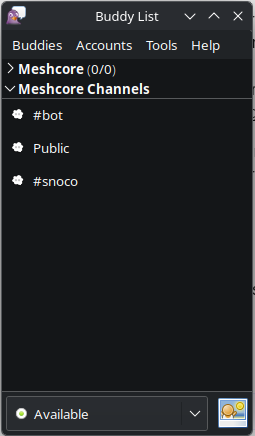
Multiple Channels
See all available mesh channels in your buddy list, with automatic discovery and joining.
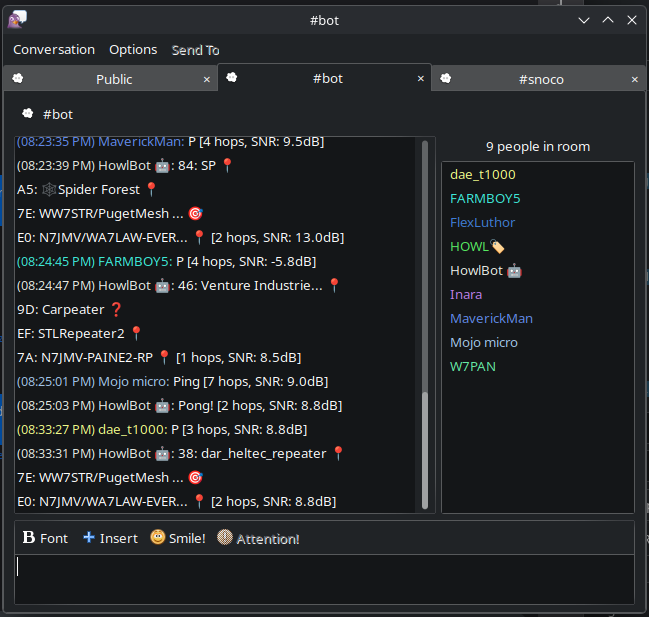
Chat Interface
Clean chat interface showing messages with routing information, dynamic user lists, and real-time communication.
⚙️ Installation
Make sure you have the required development packages:
Ensure meshcore-cli is installed and accessible in your PATH:
Download the binary and copy to your plugins directory:
Download source and compile:
In Pidgin, add a new account with protocol "Meshcore" and configure your device path (e.g., /dev/ttyACM0) and baudrate (115200).
🔧 Technical Details
New in Latest Version
- Fixed Command Syntax - Uses correct meshcore-cli commands:
publicfor channel 0,chan Xfor other channels - Dynamic User Tracking - Users automatically added to channels when they send messages
- Channel ID Mapping - Proper mapping between Pidgin chat IDs and meshcore channel indices
- Routing Information - Display hop count and SNR for each message
- libpurple Compatibility - Works with older libpurple versions (2.x)
Technical Specifications
Command Mapping
Features
- ✅ Multi-channel chat rooms
- ✅ Direct messaging
- ✅ Dynamic user discovery
- ✅ Automatic channel joining
- ✅ Message routing information
- ✅ Real-time message polling
- ✅ Configurable device settings
- ✅ Buddy list integration